• Skip to primary navigation
  • Skip to main content
  • Skip to primary sidebar

Jack and Mo

A Boutique Design Agency | Logo Design & Love For Your Brand.

  • Home
  • About
  • Work Together
    • Design Services
    • Design Shop
  • Portfolio
    • Logo Portfolio
    • Brand Style Guides
  • Kind Words
  • Blog
  • FAQ
  • Contact

What Is The Difference Between RGB and CMYK Color?

Color Theory, Design Topics, Graphic Design, Understanding Graphic Design

What Is The Difference RGB and CMYK color?

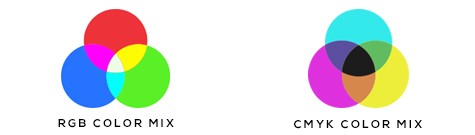
This is a question I answer on the regular. What is the difference between RGB and CMYK? And what the heck does it mean? RGB (red, green, blue) color is meant for the web; these colors are written using light on screen. Colors often appear very vibrant, saturated and bright in RGB. CMYK (cyan, magenta, yellow and black) is built color on paper using 4 colors of ink. Color in CMYK tends to be a bit lighter and less vivid, despite what we might see on the monitor.

RGB and CMYK diagram

If you change an RGB file to CMYK, the colors will shift.

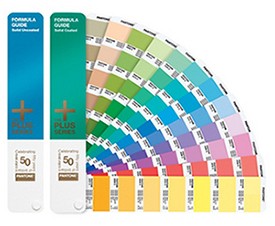
To make absolutely sure something prints a specific color, the use of a Pantone-specific color with a professional printer is required.

Pantone Guide 

Pantone Swatch Guide

You have to specify a Pantone color which only certain professional printers can do. Pantone colors are how corporations and big businesses ensure they have the same color throughout (like Facebook Blue, for example.)

The Easiest Way Around This
If you are doing your own printing or having something printed locally, the very best bet is trial and error. If a file prints a little lighter and/or muted, then you edit it on screen to be a bit darker so that it prints a bit darker. You go back and forth until the file prints with colors you like. In the image editing software of your choice, try adjusting the saturation to be a bit higher. Sometimes bumping up the contract  will also yield a brighter printed image.

Are you using a Mac? Colors on a mac screen are WYSIWYG (what you see is what you get). So, you know your monitor is always calibrated correctly and colors appear as they should. If you are using a PC, calibrating your monitor may help.

Keep in mind that the brightness and contrast setting on your monitor will also have an effect on the appearance of color- both Mac and PC.

You might also like

  • Brand Brilliance Book

    A Journey of Authenticity: The Brand Brilliance Book

  • Free Color Palette: Cinque Terre

  • Celestial Tide by Tobias Tovera

    How to Get All Those Amazing Color Codes!

adobe creative suite, cmyk, graphic design, rgb

Primary Sidebar

Love Jack and Mo Logo Design

LOVE JACK AND MO

Sharing tips, tricks, resources on logo design + branding #creativemagic

HELP FOR NEW CLIENTS

How To Create The Perfect Logo

How To Name Your Business

Why Trendy Script Fonts May Not Be Right For Your Logo

How to Write a Tagline in 3 Easy Steps

Color Psychology + Branding

Creating a Website With Limited Cash Flow

4 Steps to Creating a Logo

Why Pinterest Can Be Bad for Branding

Gold Foil… How Do You Print It? 

What is Image Resolution?

Understanding Commercial Font Licensing

Detailed Logos- Solutions For Making It Work

What Is The Difference Between RGB and CMYK Color?

What Is The Difference Between Vectors and Pixels?

How To Get Color Codes For The Web

FREEBIES

Beautiful Desktop Wallpapers {1}

Desktop Wallpapers {2}

Free Color Palette: Boundaries Blues

Free Color Palette: Botanical Abstract

Free Color Palette: Tropical Tones

more…

  • Email
  • Facebook
  • Instagram
  • Phone
  • Pinterest

  • Home     About     Portfolio     Work Together     Blog     FAQ     POLICIES     Contact


JACK + MO © 2008 - 2026