• Skip to primary navigation
  • Skip to main content
  • Skip to primary sidebar

Jack and Mo

A Boutique Design Agency | Logo Design & Love For Your Brand.

  • Home
  • About
  • Work Together
    • Design Services
    • Design Shop
  • Portfolio
    • Logo Portfolio
    • Brand Style Guides
  • Kind Words
  • Blog
  • FAQ
  • Contact

What Is The Difference Between Vectors and Pixels?

Design Topics, Graphic Design, Logo Design, Understanding Graphic Design

what is the difference between vectors and pixels

I am going to try and make this technical jargon easy to understand quickly and painlessly!

What is the difference between vectors and pixels… what does it all mean?
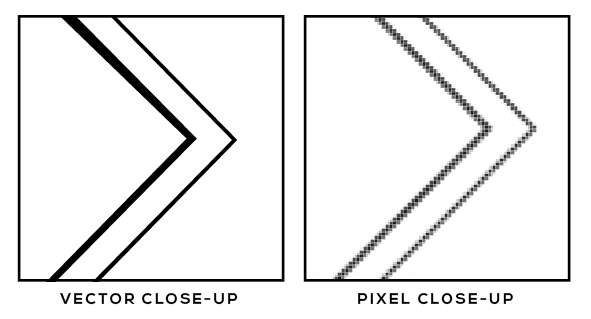
Vector Vs. Pixel
Note the difference! Smooth lines on the left, grid lines on the right

I answer this question several times a week. If my clients want to know this, I am sure countless others do, too.

Vector is a type of graphic file that is made up of a series of lines, points curves and shapes.

Why are vectors great? They can be resized infinitely, from itty bitty to billboard size and beyond. If you zoom in 300 times, the lines will still be crisp and clean.

Close up of vector image

Vector files can be in the file format of .AI file or .EPS created in Adobe Illustrator when pertaining to logo design, but may also be in the form of CGM, SVG, RS-274X, and more when using other programs. Of course, Illustrator is my cup of tea and tool of the trade!

For more vector-specific information, Wikipedia has a detailed description that reads a bit dry (*cough, cough*) for sure, but is informative.

Raster (pixel-based) files are a series of pixels, or small dots in a grid. (You may also see this word in the form of “rasterized.”)

Pixel files can come in the form of JPG, TIFF, RAW, GIF, BMP, PNG as well as a variety of others. The higher an image resolution is, the closer these little dots are together (yielding a higher quality image.)
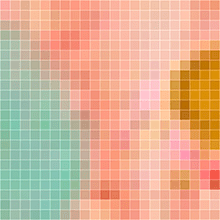
Close up of pixel grid

I tend to most often use JPG and PNG for graphic design projects- print and web. PNG and TIFF are both wonderful because they allow for transparent backgrounds. JPG does not.

Why are pixels great? You can save a graphic file to a specific size and keep the file size down. This can help images load more quickly online.

Why are pixels not great? Once you size a pixel image down, you lose quality. You cannot make a small pixel image larger.

Are there other specific file types you want to know about? (i.e. 3D Vector Formats, other 2D Vector formats, Types of Rasters) Wikipedia’s Image File Format Article will do just the trick!

You might also like

  • Free Color Palette: Boundary by Laurie Fisher

  • stella_marie_baer_palette

    Free Color Palette: A Painter’s Palette

  • How to Easily Critique Your Own Design Work

understanding graphic design, vectors and pixels

Primary Sidebar

Love Jack and Mo Logo Design

LOVE JACK AND MO

Sharing tips, tricks, resources on logo design + branding #creativemagic

HELP FOR NEW CLIENTS

How To Create The Perfect Logo

How To Name Your Business

Why Trendy Script Fonts May Not Be Right For Your Logo

How to Write a Tagline in 3 Easy Steps

Color Psychology + Branding

Creating a Website With Limited Cash Flow

4 Steps to Creating a Logo

Why Pinterest Can Be Bad for Branding

Gold Foil… How Do You Print It? 

What is Image Resolution?

Understanding Commercial Font Licensing

Detailed Logos- Solutions For Making It Work

What Is The Difference Between RGB and CMYK Color?

What Is The Difference Between Vectors and Pixels?

How To Get Color Codes For The Web

FREEBIES

Beautiful Desktop Wallpapers {1}

Desktop Wallpapers {2}

Free Color Palette: Boundaries Blues

Free Color Palette: Botanical Abstract

Free Color Palette: Tropical Tones

more…

  • Email
  • Facebook
  • Instagram
  • Phone
  • Pinterest

  • Home     About     Portfolio     Work Together     Blog     FAQ     POLICIES     Contact


JACK + MO © 2008 - 2026