• Skip to primary navigation
  • Skip to main content
  • Skip to primary sidebar

Jack and Mo

A Boutique Design Agency | Logo Design & Love For Your Brand.

  • Home
  • About
    • Kind Words
    • FAQ
  • Portfolio
    • Logo Designs
    • Brand Gallery
    • Brand Style Guides
  • Work Together
  • Shop
    • Custom Design Packages
    • The Logo Collection
  • Studio Articles
  • Say Hello
  • Cart

    How to Create Beautiful Color Palettes From Any Image

    Business + Marketing, Color Theory, Graphic Design, Understanding Graphic Design

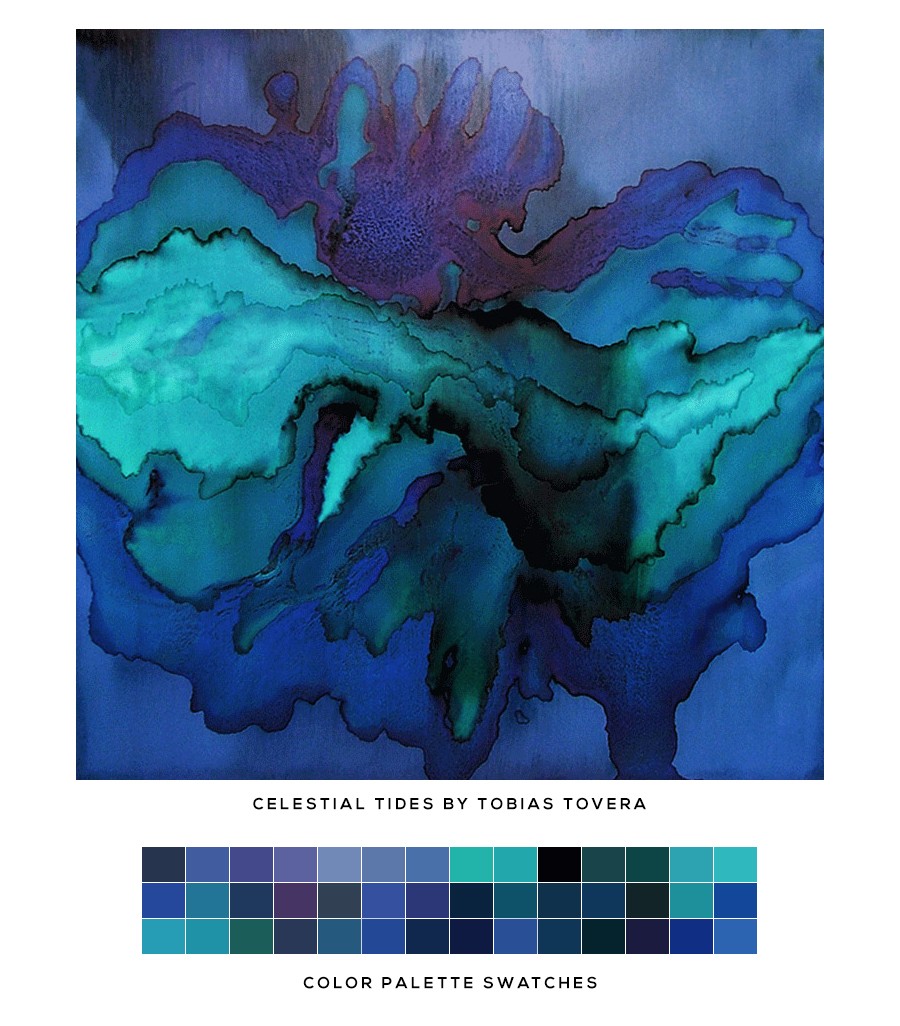
    Celestial Tide by Tobias Tovera

    Have you ever come across an image online with colors so beautiful you wished you could pull them directly into a design project? Good news — it’s easier than ever. You can create a color palette directly from an image.

    There are several simple tools that can instantly generate a full color palette from an uploaded image or even a pasted image URL. Within seconds, you can view light, medium, and dark tones, copy exact HEX color codes, and build a palette inspired by photography, artwork, interiors, fashion, or nature.

    A few great options:

    • Adobe Color
    • Coolors.co
    • Canva Color Palette Generator

    These tools make it incredibly easy to explore color relationships and discover combinations you may not have considered otherwise.

    One of my favorite ways to use them is when gathering inspiration at the beginning of a branding project. Sometimes a single image can spark an entire visual direction.


    If you’re looking for a thoughtfully designed visual identity or custom logo design for your business, feel free to get in touch. I’d love to help bring your ideas to life.


    Artwork shown is by Tobias Tovera entitled Celestial Tide. Be sure to explore more of his incredible work.

    You might also like

    • Why Pinterest Can Be Bad for Branding

    • Why Trendy Script Fonts May Not Be Right For Your Logo

      Why Trendy Script Fonts May Not Be Right For Your Logo

    • What Is The Difference Between RGB and CMYK Color?

    Adobe Color, brand colors, brand design, branding, branding inspiration, Canva Color Palette Generator, color codes, color inspiration, color palette, color palette generator, color picker, Coolors, creative resources, design inspiration, extract colors from image, graphic design, HEX colors, hex number values, image color palette, logo design, photoshop color swatches, rgb, visual identity, web color codes, web design

    Primary Sidebar

    Studio Articles by Jack and Mo: Logo love, branding brilliance. Tips, tricks, and resources for logo design + branding. #creativemagic

    FROM THE STUDIO

    Logo love, branding brilliance.

    Tips, tricks, and resources for logo design + branding. #creativemagic

    Recent Posts

    • The Art of Creating a Brand Color Palette
    • How to Create Beautiful Color Palettes From Any Image
    • The Best Websites to Explore Color
    • What is a Logo, Really? (and What Makes One Great)
    • How to Create the Perfect Brand Identity
    • What Is a Brand Style Guide — and Why Does It Matter?
    • How to Make Your Brand Identity Memorable
    • How to Match Paint Colors to Your Branding
    • Need a Website but Have Limited Cash Flow? How to Get Started on the Web
    • Why Pinterest Can Be Bad for Branding
    • Gold Foil is Stunningly Beautiful! But How Do You Print it?
    • What is Image Resolution?
    • Email
    • Facebook
    • Instagram
    • Pinterest

    • Home     About     Portfolio     Work Together     Shop     Studio Articles     FAQ     Policies     Contact


    DESIGNED BY JACK + MO
    © 2008 - 2026